
Public Switched Telephone Network (PSTN) voice is considered a business-critical with high expectations for voice quality. Direct Routing lets you control media traffic flows to accommodate a multitude of network topology and local telephony setups.
Local Media Optimisation for Direct Routing lets you manage voice quality by:
- Controlling how media traffic flows between the Teams clients and the customer Session Border Controllers.
- Keeping media local within the boundaries of corporate network.
- Allowing media streams between the Teams clients and the SBCs even if the SBCs are behind corporate firewalls with private IPs and not visible to Microsoft directly.
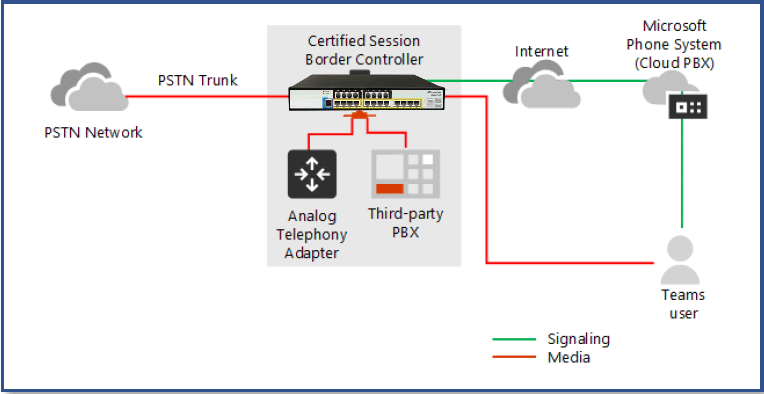
Teams Direct Routing call with Media ByPass
• User located outside of the Customer premises (External User)
• User does not have access to the public IP address of the SBC
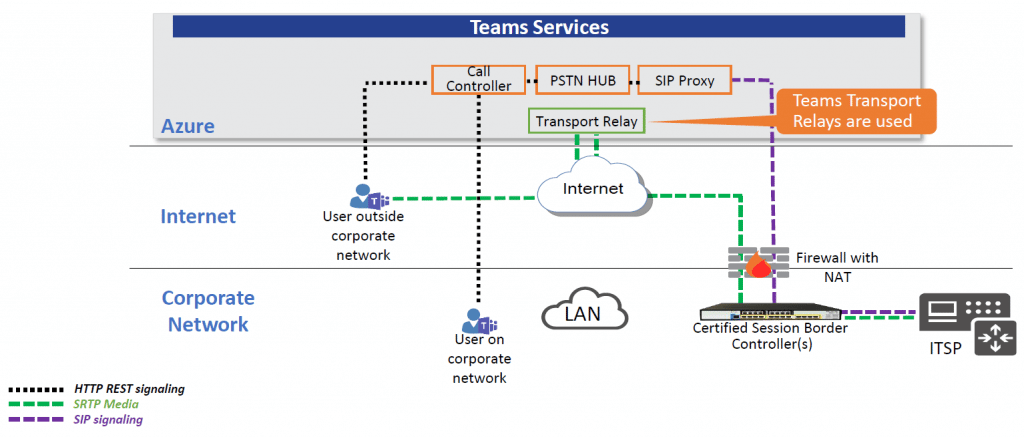
Location based and Media path optimisation
Both Location Based Routing and Media Path Optimisation technologies use information about the client location to function properly.
The use of this information and roles of Microsoft and SBCs are different
– Location Based Routing
– Microsoft fully owns the decision if a call should or shouldn’t be established
– the call might even not be routed to the SBC
– Media Path Optimisation
– Microsoft provides supplemental data to SBC
– SBC makes routing decision by providing Media Termination Candidates in SDP based on the input received from Microsoft
Supported Scenarios
Central SBC
– Centralisation of all trunks through a single SBC connected to the ITSP
– Providing telephony services to all branch offices of the company
Proxy SBC
– Virtual network topology of SBCs
– The SBCs in the local branch are connected to a centralised proxy SBC
– Only the proxy SBC is visible to Microsoft and communicating through external IP
– Branch SBCs are communicating through internal IPs and not visible to Microsoft
Proxy and Central SBC
Local Media Optimisations Modes
Always Bypass
– In this case where the Teams client is internal the local media candidates of the target SBC will always be offered to the client
OnlyForLocalUsers
– The local media candidates of the target SBC is offered only if a user is in the same location as the SBC
– For all other cases either the local or external IP of the proxy SBC is offered
Configuration on Microsoft side
Run the following PowerShell commands for PSTN Gateway on Teams Direct Routing
– New-CsOnlinePSTNGateway -Identity sbc1.example.com -SipSignallingPort 5061 -ForwardCallHistory $True -ForwardPai $True -MediaBypass $True -Enabled $True
– Set-CsOnlinePSTNGateway -BypassMode alwasbypass (or OnlyForLocalUsers) -ProxySbc $null
– New-CsTenantTrustedIPAddress -IPAddress {Public IP (After NAT)} -MaskBits {Subnet Mask Prefix} -Description “Description Text”
Teams – New Message Headers
– X-MS-UserLocation: Indicates whether the Teams user is inside or outside the corporate network
– X-MS-MediaPath: Indicates the FQDN of the SBC devices in the network that the call must traverse
– X-MS-UserSites: Indicates the name of the network site
SBC Configuration
IP Group Table
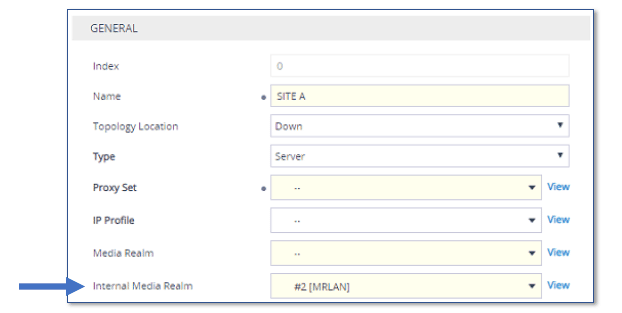
– Internal Media Realm Parameter
– If the Teams user is calling from inside the corporate network, RTP flows via SBC internal media interface
– Teams Local Media Optimisation Handling
– None (default): The device ignores the Teams headers in the sip message and uses the “regular” Media Realm assigned by the IP Group’s Media.
– Teams Decides: The routing decision is made according to the Microsoft Teams headers for the primary route
– SBC Decides: The SBC check the X-MSUserLocation header. However, does not check the X-MS-MediaPath header when configured to the “SBC Decides” option, the media traverses the devices (i.e., no direct media)
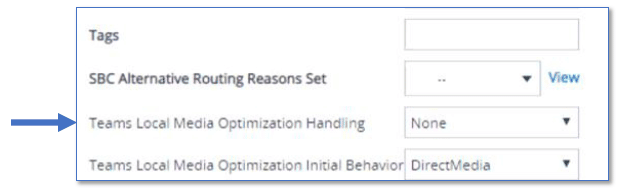
– Teams Local Media Optimisation Initial Behaviour
– Direct Media: Perform direct media call towards Teams
– Internal: Perform non-direct media call toward Teams sing internal Media Realm
– External: Perform non-direct media call toward Teams sing external (regular) Media Realm

Good day! I just wish to give you a huge thumbs up for your excellent information you have got here on this post. I am coming back to your blog for more soon.
Thanks for your blog, nice to read. Do not stop.